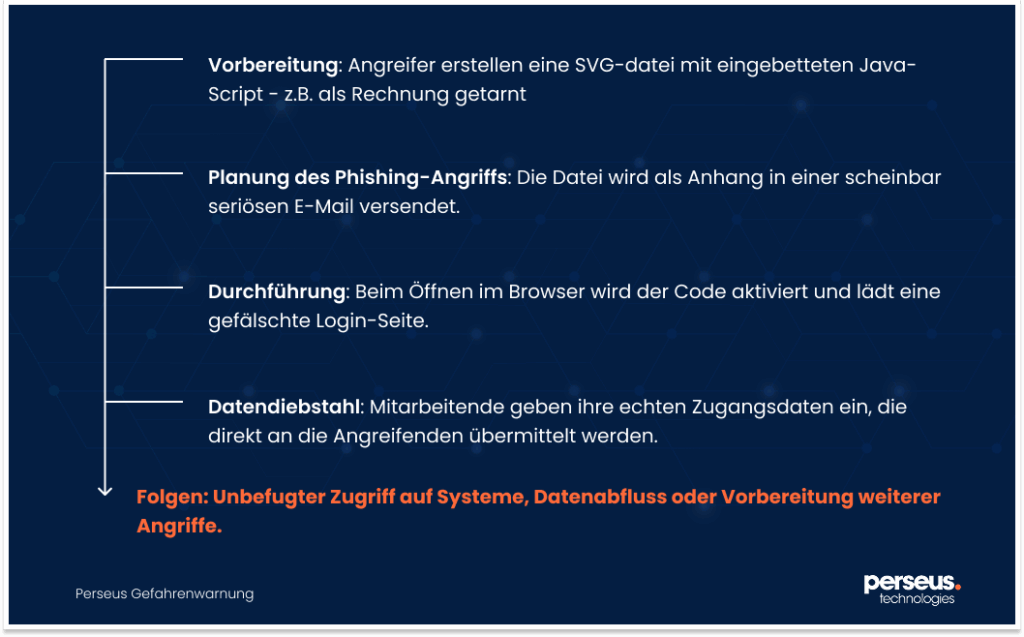
Currently, there is an increased threat to IT security from e-mail attachments in SVG format. Security organizations and the Austrian CERT are observing an increase in targeted phishing attacks, in which malicious code is distributed via seemingly harmless vector graphics.
The following is background information as well as concrete recommendations for protecting systems from this attack method.
Threat actors target programs like Outlook that have a vulnerability to spy on NTLM credentials. The program is tricked into authenticating itself to a fake server that they control. Once the credentials are exposed, they can be used for malicious purposes.
What happened?
Currently, CERT.at and numerous email security vendors are seeing an increase in phishing campaigns that use email attachments in Scalable Vector Graphics (SVG) format. These vector graphics contain embedded JavaScript code that can be executed from the browser when opened. Attackers use this to load fake login pages or install malware – with the aim of grabbing access data. The affected SVG files often disguise themselves as invoices, voice messages, or documents to be signed.
Who is affected?
Organizations whose email systems do not perform specific checking or filtering for SVG files are particularly at risk. Many security solutions do not recognize these files as dangerous because SVGs are perceived as images. This increases the risk, especially where attachments are opened directly via web browsers or devices.
How can I protect myself?
To detect and fend off attack attempts at an early stage, you should take the following measures:
Block the receipt of SVG files at the Internet access point/mail gateway via the MIME type image/svg+xml (e.g. in the proxy or firewall; however, can lead to the incorrect display of web pages or emails with legitimate SVG images)
Have SVG files automatically quarantined with embedded scripts
Ensure (where possible) that your AV and email security solutions detect potentially harmful behavior on SVG files
Sensitize employees specifically to attachments in SVG format and their risks
Define internal guidelines for dealing with unknown attachments
What are SVG files anyway?
SVG (Scalable Vector Graphics) is a common file format for vector graphics based on XML . Unlike pixel images (e.g. B. PNG or JPEG), SVG files can be scaled losslessly – e.g. for logos, icons or diagrams on websites.
What many people don’t know is that SVG files can contain built-in JavaScript code . This makes them – although actually intended as an image format – potentially executable and thus susceptible to abuse.