



HTTPS stands for “Hypertext Transfer Protocol Secure” and refers to a secure connection between your browser and a website.
With HTTPS, the data between your device and the website is transmitted in encrypted form. This means that third parties cannot simply read or manipulate the information.
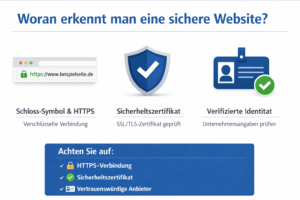
the “https://” in the address line
a lock symbol in the browser
Practical example from everyday work
An employee wants to log into a customer portal while on the move to check an order. He clicks on a link from an email and lands on a login page.
 Before entering his access data, he takes a look at the address line:
The website begins with “http://” and there is no lock symbol.
This seems suspicious to him. Instead of logging in, he cancels the process and accesses the website directly via the official company address. There he sees “https://” and the lock symbol in the browser – so the connection is secure.
Later it turns out that the first link led to a fake website that was supposed to capture access data.
Result: By paying attention to HTTPS, the employee was able to prevent his access data from falling into the wrong hands.


