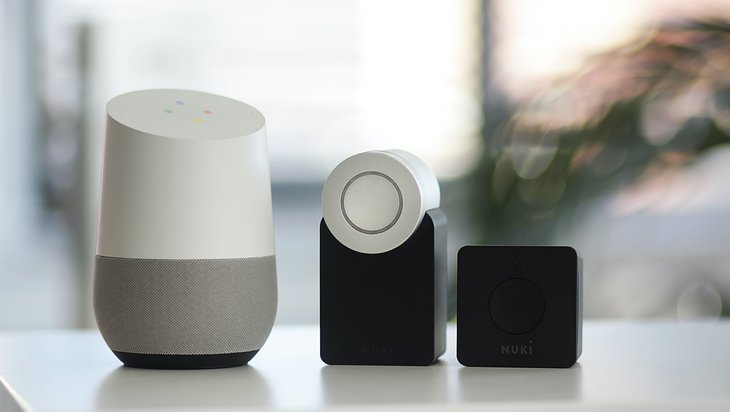
Voice assistants such as Alexa are there for us on demand. But many users are wondering: Is the voice assistant actually always listening in? And if so, what does that mean?
Alexa always has an open digital ear
Voice assistants such as Alexa, Google Assistant and Siri are usually activated by certain words. This only works if they always have an open ear in the figurative sense. Because only then can they notice when the activation word is mentioned. Technically, they are always listening.
If you turn the device off or mute, you turn off this listening function – but you can no longer control the assistant by voice command.
What do we actually mean by eavesdropping?
For us humans, “listening” means that we process and store a piece of information we hear. A voice assistant like Alexa doesn’t do that as long as it’s just waiting for a voice command.
When does listening become listening?
Voice assistants only process and store what they hear after they have recognized the wake word. For example, “Alexa” or “OK Google”. Then the assistant records what is being said. In most cases, it sends this recording via WLAN to an external server for processing. There, the spoken word is analyzed, the answer is processed and sent back to the device. All this happens within a few seconds, so that the voice assistant responds with hardly any delay. Good to know: The recording of the voice command is usually stored on the server where it was analyzed.
Can anyone listen to these saved voice recordings?
Yes, it is possible that these recordings will reach other people’s ears. This is because employees of the providers listen to some of the recordings to compare how well the current software has recognized and answered them.
How can I prevent my saved voice recordings from being listened to?
Depending on the provider, you can prohibit or disagree to the analysis of your recordings in your voice assistant’s settings.
But: In the past, due to software errors, recordings were sometimes analyzed despite contrary settings. Therefore, we advise you to delete existing recordings if necessary and not to save future recordings or only for a limited time.
Delete recordings: Usually, you can specify in the settings of your voice assistant that all recordings are deleted. In some cases, you can also check the recordings manually, listen to them if necessary and delete them. Similarly, you can command some voice assistants to delete what you’ve heard at any time.
Do not save recordings or only save them for a limited period of time: In the settings of your voice assistant, you can specify that recordings are not stored at all or only for a limited period of time.
Will my saved voice recordings be used for personalized advertising?
For Alexa and Google Assistant: Yes. You can find more detailed information about this in the Alexa Terms of Service and in the Google Privacy Policy. Apple, on the other hand, emphasizes in the information on Siri and privacy: “We use this data exclusively to improve Siri. We don’t share them and we don’t sell them.”
If you use another voice assistant, such as Samsung’s Bixby or Microsoft’s Cortana, see the Privacy Policy or Terms of Use.
Don’t share everything with the internet: Siri
By the way, the Siri voice assistant processes some requests directly on the device. This can be easily checked if the Internet is deactivated. For example, you can set an alarm, dictate notes, and set reminders. However, these voice commands are also recorded and later shared with Apple – if you don’t delete the dictation history first.
Attention! Voice assistants can activate similar-sounding words.
Voice assistants can also mishear. For example, Alexa can feel addressed when an Alexander is visiting you. Or the Google Assistant confuses a mumbled “Ok, good!” with “Ok Google”. In the case of such errors, the spoken word is also recorded and sent to the external servers.
If you notice such an unwanted action, ask the voice assistant why it is responding. You can also command it to delete the recording directly.
Tip: Activate beeps with which your voice assistant shows you that it is processing what is currently being spoken. Then you will notice unwanted activations even when you are not keeping an eye on it.
Can anyone use my voice assistant?
With the correct activation word, yes, in principle. Then your children, guests or complete strangers can also order things or open the doors to your smart home if necessary.
Most voice assistants are now able to recognize different voices. But this is more for personalization, e.g. which music playlists belong to which person. Voice recognition is not yet sufficient as a safeguard against misuse of the voice assistant.
How can I protect my voice assistant against unauthorized use?
The easiest method is to mute or turn it off when you’re not around. In addition, you can protect certain functions such as shopping or opening door locks with a PIN. But: You say this PIN out loud every time you use it. Anyone who listens to it can also use it later. Of course, you can also simply deactivate functions that seem too risky to you or not set them up at all.
Safety tips for your voice assistant
- Prevent unauthorized persons from giving voice commands to your voice assistant. For example, keep your distance from open windows.
- Mute your voice assistant or turn it off when you’re not there.
- Set up a PIN or password for sensitive functions, such as online purchases or opening door locks.
- Do not use your voice assistant in a publicly accessible Wi-Fi network. Ideal: Set up your own, password-protected Wi-Fi for him.
- Usually, updates for your voice assistant are installed automatically. Nevertheless, occasionally check in the settings of your voice assistant that your device is up to date.